


Hi everyone! I’m Tarak Vora. A redesign can lift your brand overnight and wipe out your Google traffic just as fast. The difference is almost never the design. It is whether someone planned the redirects.
Tarak, the new site looks amazing, but our enquiries have dropped. What happened?
I have been doing SEO for 15 years. In that time I have watched algorithms change, ranking factors come and go, and a hundred “SEO is dead” headlines. One thing has not changed: the phone call I get a few weeks after a client launches a shiny new website.
Nine times out of ten, I open Google Search Console and see the same picture. Hundreds of old URLs return 404. Pages that ranked for years have vanished. Backlinks that took a decade to earn now point at nothing. Nobody broke the website on purpose. They just forgot that Google had memorised the old one.
In this post I want to talk to you the way I talk to my own clients. No jargon for the sake of it. Just what I have learned about redirects, why they protect your rankings, and the exact process I follow on every redesign.
What a Redirect Actually Does
A redirect is a forwarding address for a web page. When someone, or Googlebot, asks for an old URL, the server replies “this page lives somewhere else now” and sends them to the new one. That sounds simple, but it carries three things your business depends on:
You would never move to a new street without putting a sign on the old door. A redirect is that sign, and Google reads it every single day.
What Happens When a Redesign Launches Without Redirects
Most redesigns change URLs, even when nobody plans to. A new theme uses a different permalink format. A developer renames “/our-services/” to “/services/”. Categories get merged. Old blog posts are left out of the new build. Each of these is a URL change, and each one needs a redirect. Here is the pattern I have seen again and again when that step is skipped:
Week 1: everything looks fine
Google is still showing the old URLs from its index, so traffic holds.
Weeks 2 to 4: rankings start slipping
Googlebot recrawls and finds 404s where your best pages used to be.
Month 2: old URLs drop out
The new URLs have no history, so they rank far lower or not at all.
Month 3: the leads dry up
The business owner notices fewer enquiries, and by then the damage is weeks old.
The frustrating part is that the content may be better than before. Google simply has no way of connecting the new page to everything the old page earned. A redirect is that connection.
Choosing the Right Status Code
Not every redirect is the same, and picking the wrong one is one of the most common mistakes I find in audits. A good redirect manager should let you choose the status code, not force one on you. Here is how I decide:
| Status code | What it tells Google | When I use it |
|---|---|---|
| 301 Moved Permanently | The page has a new permanent home; move its signals there | Redesigns, URL and slug changes, merged pages, HTTP to HTTPS |
| 302 / 307 Temporary | The page is away for now; keep the old URL indexed | Short maintenance, seasonal swaps, A/B tests |
| 308 Permanent Redirect | Same as 301, but the request method is kept | Forms and API endpoints that receive POST requests |
| 404 Not Found | Nothing lives at this address | No relevant replacement exists |
| 410 Gone | Removed on purpose and not coming back | Discontinued products, expired offers you want out of the index |
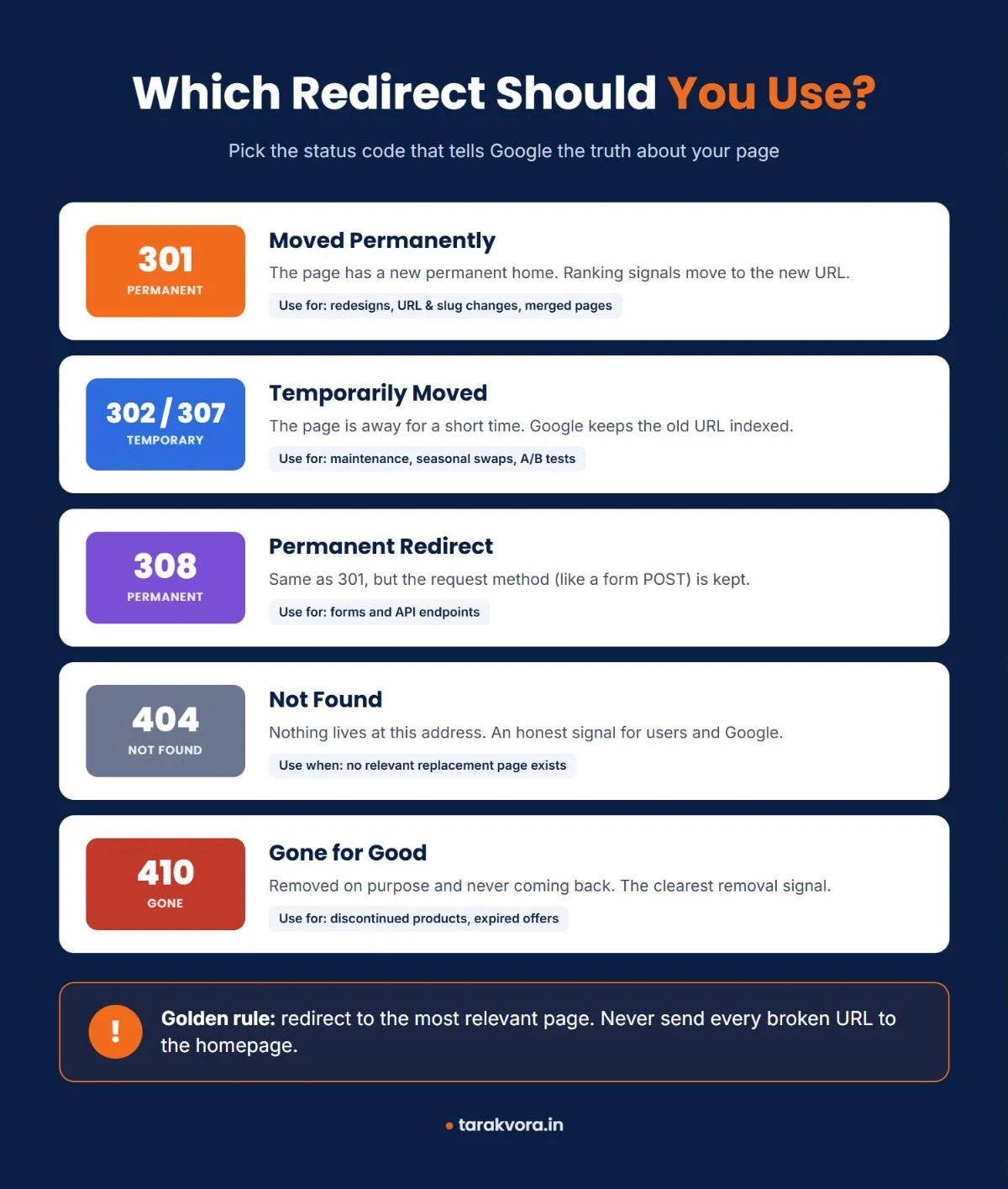
For a redesign, 301 is the workhorse. I only reach for a 302 when I genuinely plan to bring the old URL back. If a 302 is left in place for months, you are sending Google a mixed message about which page is the real one.
The code people forget is 410. Many CMSs do not even offer it, so teams fall back to a redirect or a lazy 404. When content is truly retired, a 410 is the cleanest, most honest answer.
The Mistake I See Most: Redirecting Everything to the Homepage
When a redesign leaves hundreds of broken URLs, the quickest “fix” is a single rule that sends every 404 to the homepage. It looks tidy in a crawl report. It is also one of the worst things you can do.
Google’s Martin Splitt was asked about exactly this in an SEO Office Hours short. His answer was clear: yes, it can hurt you, and as a user he finds it frustrating. A 404 is useful information. It tells people and crawlers that a link is broken or a page no longer exists. A blanket redirect hides that signal and drops people on a page that has nothing to do with what they wanted. For crawlers it is even worse, because every missing URL bounces them back to the start of the site. (Search Engine Journal)
“A 404 is not a failure. A misleading redirect is.
— Tarak Vora
Think about it from the visitor’s side. Someone clicks an old link to your “Shopify SEO” guide and lands on your homepage. They do not see a guide. They see a hero banner and leave. Google sees that too, and it usually treats these mass redirects as soft 404s anyway, so you gain nothing. My rule is simple, and it matches what Splitt recommends:
My redirect rule
- The content moved? Redirect to the one specific page that replaces it.
- The content is gone? Let it return a 404 or 410.
- Nothing truly matches? Do not force a “closest” page. An honest 404 with a helpful error page beats a misleading redirect.
Redirect Chains, Loops and Stale Internal Links
Setting up redirects is only half the job. The other half is making sure your own website stops relying on them. After a migration, almost every internal link still points to an old URL. Your menu, your footer, the links inside your blog posts: all of them now go through a redirect before reaching the real page. Do that a few times over the years and you get chains like this:
/services.html → /our-services/ → /services/ → /services/seo/
Each hop costs a little crawl time and adds a little delay for the visitor. Long chains can also stop Googlebot before it reaches the final page. A loop, where URL A sends to B and B sends back to A, makes a page completely unreachable.
In a recent Search Engine Journal piece, SEO Sally Mills described cleaning this up after moving a large site to a new CMS. She wrote a script that followed every internal link to its final destination and rewrote it, and she recommends running that kind of cleanup regularly. I fully agree. On my own projects I crawl the new site straight after launch, export every internal link that returns a 3xx, and update it to the final URL.
The same article tells a story every SEO should remember: one stray pipe character in a regex redirect rule matched every URL on a site and sent them all to one page. I always test new redirect rules against a sample of real URLs before I save them.
The Quiet Duplicates: HTTPS, www, Slashes and Capitals
Some redirect problems do not show up as errors. They show up as duplicate pages that split your ranking signals. Look at these four addresses:
http://example.com/services
https://example.com/services/
https://www.example.com/Services/
https://www.example.com/services/
To you, that is one page. To a crawler, it can be four. During a redesign I always make sure the site enforces one version of every URL with a single 301, not a chain:
- One protocol: everything goes to HTTPS.
- One host: pick www or non-www and redirect the other.
- One trailing slash style: with or without, but never both.
- Lowercase URLs: uppercase variants redirect to the lowercase version.
Not every platform does this for you. Mills points out, for example, that Shopify does not redirect trailing-slash variants. So test it yourself: type each variation of an important URL into your browser and check that it lands on the same address in one hop.
My Redirect Process for Every Website Redesign
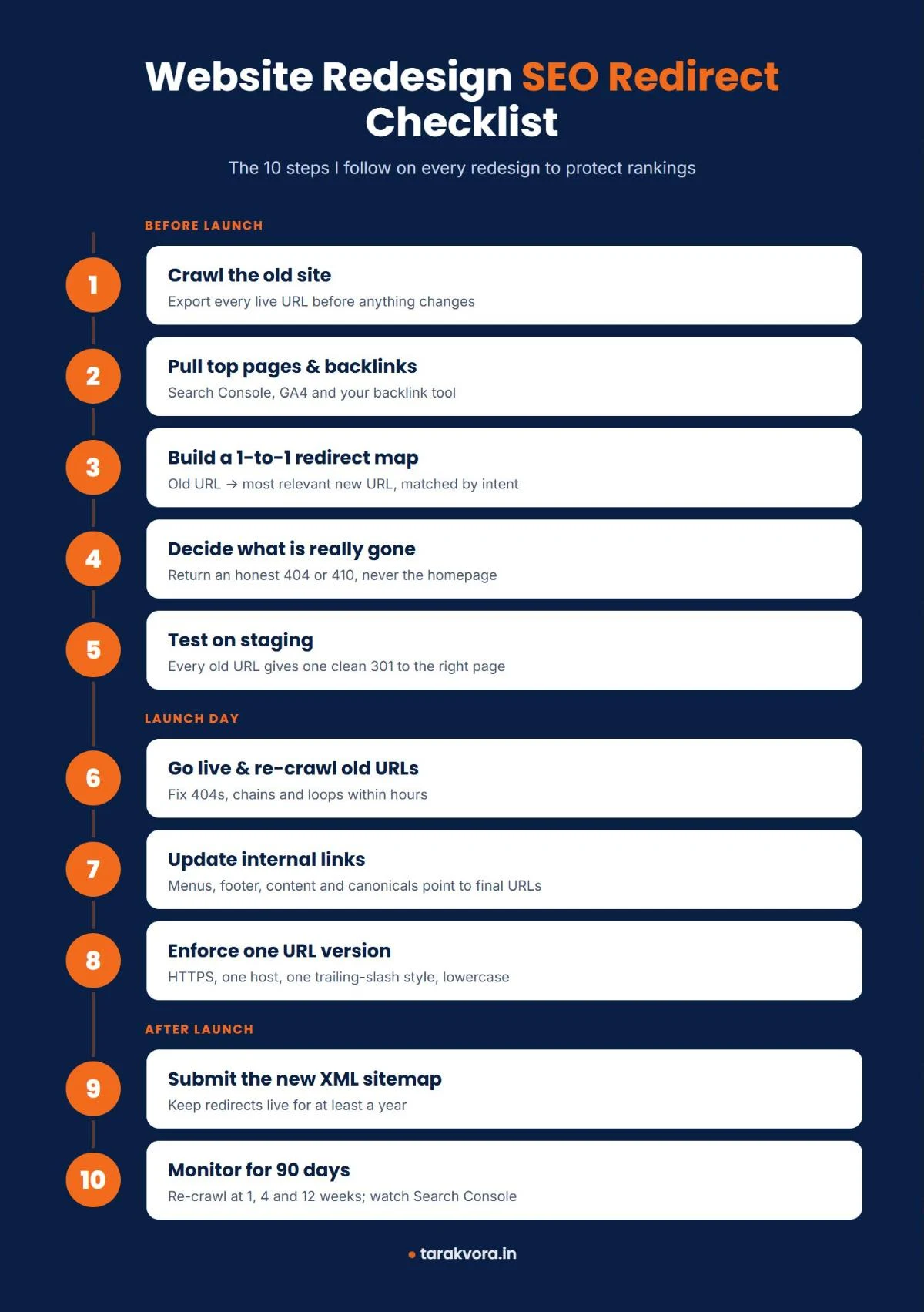
This is the process I follow on client projects. It is not glamorous, but it is the reason my clients’ redesigns usually hold their rankings instead of losing them.
Crawl the old site before anything changes
Use Screaming Frog, Sitebulb or any crawler and export every URL that returns 200. This list disappears the day you launch, so save it first.
Add the URLs Google and users actually use
Export top landing pages from Google Search Console and GA4, and pages with backlinks from Ahrefs, Semrush or Search Console’s Links report.
Build a one-to-one redirect map
In a sheet, put every old URL next to its new equivalent. Match by topic and intent, not by convenience. This is the most important document in the project.
Decide what is really gone
For pages with no replacement, mark them 404 or 410. Do not stuff them into the homepage.
Implement and test on staging
Load the map into your server config, Rank Math or the Redirection plugin, and check every old URL gives a single 301 to the right page.
Launch and re-check within hours
Crawl the old URL list again on the live domain. Fix any 404s, chains or loops immediately.
Update internal links to final URLs
Menus, footer, buttons, in-content links, canonicals and hreflang tags should all point to the new URLs directly.
Enforce one version of each URL
HTTPS, one host, one slash style, lowercase.
Submit the new XML sitemap
Add it in Search Console. Keep redirects live for at least a year, and ideally forever for pages with strong backlinks.
Monitor and re-crawl
I check after 1 week, 4 weeks and 12 weeks.
After Launch: What I Watch in the First 90 Days
A redesign is not finished on launch day. Google takes weeks to recrawl a site and move its signals across, so I keep a close eye on a few reports:
- Search Console Pages report: a sudden jump in “Not found (404)” or “Page with redirect” tells me something was missed.
- Old URLs in the index: a site: search for old URL patterns shows whether Google still holds the old pages.
- Top landing pages in GA4: I compare organic sessions for the top 20 pages before and after launch.
- Crawl stats: if Googlebot spends a lot of time on redirects, internal links still need updating.
- Fresh 404 logs: a redirect plugin’s 404 log shows real URLs people and bots still request.
Small dips in the first two weeks are normal while Google re-processes the site. A drop that keeps going after a month is not normal, and it is almost always a redirect problem.
Why Your CMS Should Do More of This for You
After 15 years, I still raise the same developer tickets for redirects on almost every project. Sally Mills makes the same point in her list of SEO features every CMS should ship with: redirects are basic infrastructure, yet many platforms still treat them as an afterthought. If you are choosing a CMS or plugin stack for a redesign, these are the redirect features I look for:
Must-have redirect features
- Automatic 301s when a URL or slug changes
- A choice of 301, 302, 307, 308 and 410
- Regex and query-string control with rule testing
- Loop and chain protection
Nice to have
- Scheduled redirects for offers and events
- A broken internal link report with bulk fixes
- Proper 404 and 410 pages that return the right status code
- A 404 log to spot missed URLs
On WordPress, Rank Math’s redirect manager or the Redirection plugin cover most of this. Rank Math even offers to create a redirect when you change a post’s slug. Whatever you use, make sure someone owns redirects after launch, not just on launch day.
Final Thoughts
Google’s updates will keep coming. Core updates, AI Overviews, new ranking signals: the headlines change every year. But the way Google understands your site still rests on URLs, status codes and links. Get those wrong during a redesign, and no amount of fresh design or new content will make up for it quickly.
So here is my advice, from one website owner to another: before you approve the new design, ask your developer or agency one question. “Where is our redirect map?” If they do not have an answer, pause the launch until they do.
Planning a redesign, or already seeing a traffic drop after one? Book a free consultation and I will review your redirects and tell you exactly what to fix.
Frequently Asked Questions
Will I lose rankings even with 301 redirects?
How long should I keep redirects in place?
Is it OK to redirect all old pages to the homepage?
Should I use 301 or 302 for a redesign?
What tools do I need for a redesign redirect plan?
References: The 11 SEO features every CMS should ship with (most still don’t) and Google’s Martin Splitt warns against redirecting 404s to homepage, Search Engine Journal.